Looks like the binaries for Windows 32 and 64 bit can be found in the pretest folder, done by Philip Lord. If you have any worries about downloading from sourceforge that is.
Showing posts with label windows. Show all posts
Showing posts with label windows. Show all posts
Sunday, September 18, 2016


Saturday, October 18, 2014
Emacs 24.4 release candidate 1
Looks like Emacs release candidate is out and that the official release will come in a few days. In related news, Alexander Shukaev has posted on the help-gnu-emacs mailing lists about providing precompiled Emacs versions along with the DLLs for Windows. It may save time for those of you who need specific features that are not compiled into the official release. You should direct your queries to Alexander, on the list, I think, if you need any clarifications.
Thursday, September 13, 2012
A few Emacs related announcements
You'd have to excuse the typos, as I'm doing this in a hurry.
The Emacs 24.2 security bug fix release was done recently but the Windows build was not made available due to large binary file differences from the current to the previous version. While the issue is still being investigated, the Windows binaries are now available.
You want to know how to edit files on remote servers? Well, here's the thread on 'How to list, add, edit, save file on a remote server' that should show you how.
BTW, by coincidence there's been a new release of tramp too.
Friday, August 15, 2008
Emacs Frames and Windows
For those of you who are new to Emacs and it's terminology, here's something that you need to grasp.
A frame in Emacs is equivalent to your window in normal Windows terminology. Well, sort of. An Emacs invocation can instantiate any number of frames and you'd see it in your taskbar as individual application instances.
A window in Emacs is the one that holds a buffer. An Emacs frame can have any number of windows. At any instant, there will be one window that will have focus or be the "selected window".
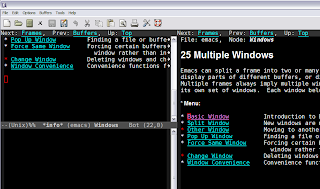
In the above picture, there is one frame with three windows. Two of the windows are showing the same help screen and the third is the scratch buffer. So you could open any number of frames using C-x 5 2 and within each create any number of buffers with C-x 2 or C-x 3. Depending on your working style and screen real estate, you could do one file on one frame or one file per window in one frame or combination thereof.
For a more detailed, see the manual sections, frames and windows.
A frame in Emacs is equivalent to your window in normal Windows terminology. Well, sort of. An Emacs invocation can instantiate any number of frames and you'd see it in your taskbar as individual application instances.
A window in Emacs is the one that holds a buffer. An Emacs frame can have any number of windows. At any instant, there will be one window that will have focus or be the "selected window".

In the above picture, there is one frame with three windows. Two of the windows are showing the same help screen and the third is the scratch buffer. So you could open any number of frames using C-x 5 2 and within each create any number of buffers with C-x 2 or C-x 3. Depending on your working style and screen real estate, you could do one file on one frame or one file per window in one frame or combination thereof.
For a more detailed, see the manual sections, frames and windows.
Thursday, July 10, 2008
Adding Emacs to your Global Context Menu in Windows
If you are a windows user and want emacs to appear in the context menu, here's one way to do that. It involves tinkering with the registry and it creates a new instance of Emacs on every file you use it on.
Thursday, March 6, 2008
Emacs Pretest available
Subscribe to:
Posts (Atom)