Ads by Google

Friday, January 16, 2009

Difference between Echo Area and Minibuffer

This thread on gnu.emacs.help provides clear description of what is the minibuffer and echo area.

The confusion arises because the location of text is the same for both. Also the OP's request is useful for a beginner too.

Tuesday, January 13, 2009

CWE/SANS TOP 25 Most Dangerous Programming Errors


Via the TheRegister, finally, someone has come up with a list of errors that will generally get you knackered when you develop your application.

Nice.

Obviously, this list will be useful to people who want to code better and  crackers, who know that things rarely if ever get patched.  Don't get me wrong, I'm all for full disclosure and all that but given the way automated patch cycles work, I'm not hopeful that  a manual sweep of applications will ever be done.

And the rest of the programming world will move on; creating "better" classes of gargantuan errors that will make the security world weep.

Bet on it.

Only when a super massive botnet gets created by some cracker which exploits some or all variations of the errors, will some cosmetic re-arrangement of the deck chairs happen.

Wednesday, January 7, 2009

Good movie formats to embed in LaTeX and PDF

This should be an interesting thread to follow for those who embed movies in their LaTeX document. A fairly good discussion on comp.text.tex on what works and what doesn't with different multimedia file formats and different viewers on different platforms.
*hey, that's 3 differents in one sentence.

Essential reading for those who want to make some interactive PDFs. Just in case, you didn't know, the popular package to embed them is movie15 which allows you embed video and audio files.

Of course, your PDF file will then be humongous; no, no magic compression or size reduction will occur.

Sunday, January 4, 2009

January 2009 TUG News

Just saw a post on the comp.text.tex newsgroup by Karl Berry on the latest TUG news. And that the new PracTeX journal is also out. To those interested in SAS and LaTeX, some of the articles might be useful.

Take a look.

Thursday, January 1, 2009

Applying the same patch again and again

I sync up my org-mode code using git by issuing git pull. And I keep getting the same error every time the one file I edit is modified.

$ git pull
remote: Counting objects: 98, done.
remote: Compressing objects: 100% (31/31), done.
remote: Total 85 (delta 57), reused 82 (delta 54)
Unpacking objects: 100% (85/85), done.
From git://repo.or.cz/org-mode
8915859..cd92610 master -> origin/master
Updating 8915859..cd92610
error: Entry 'Makefile' not uptodate. Cannot merge.

That's because the Makefile has been edited to point to the correct Emacs binary path and other customisations. So I had to rename the Makefile and then redo the command.

$ mv Makefile m
$ git pull
Updating 8915859..cd92610
Fast forward
ChangeLog | 6 +
Makefile | 2 +
ORGWEBPAGE/Changes.org | 140 ++++++++++++++++-
doc/ChangeLog | 12 ++
doc/org.texi | 170 +++++++++++++++-----
lisp/ChangeLog | 51 ++++++
lisp/org-exp.el | 291 +++++++++++++++++++++--------
lisp/org-export-latex.el | 37 +++--
lisp/org-footnote.el | 391+++++++++++++++++++++++++++++++
lisp/org.el | 81 ++++++++--
10 files changed, 1042 insertions(+), 139 deletions(-)
create mode 100644 lisp/org-footnote.el

And then edit the Makefile to re-apply the changes again. Specifically the diff lines highlighted is what I have to change everytime.

$ diff Makefile m
14c14
< EMACS=emacs
---
> EMACS=c:/gnu/emacs-22.2/bin/emacs
17c17
< prefix=/usr/local
---
> prefix=c:/gnu
76d75
< org-footnote.el \
102c101
< DOCFILES = doc/org.texi doc/org.pdf doc/org doc/dir doc/.nosearch
---
> DOCFILES = doc/org.texi doc/org.pdf doc/org doc/dir
316d314
< lisp/org-footnotes.elc: lisp/org-macs.elc lisp/org-compat.elc

Well, a simpler way to do it is as follows.

  1. Issue a git pull
  2. If the Makefile has a conflict, rename the file and issue a git pull again
  3. Generate a patch file by issuing diff -e NEWfile OLDfile > foo.patch
  4. apply the patch on the Makefile as patch Makefile foo.patch
  5. The edits that one has made is re-applied on the new Makefile
$ diff -e Makefile m
316d
102c
DOCFILES = doc/org.texi doc/org.pdf doc/org doc/dir
.
76d
17c
prefix=c:/gnu
.
14c
EMACS=c:/gnu/emacs-22.2/bin/emacs
.
$ diff -e Makefile m > b.patch
$ patch Makefile b.patch
$ make

Since I don't make any changes to org-mode codebase and the only thing that has to be changed everytime Makefile changes is the path info, this is a bit faster than editing the Makefile everytime.

Though it took me sometime to figure it out and there's still this nagging doubt whether there's a even simpler way.

Any ideas?

EDIT: Just realised that the patch file will have to edited to have ONLY the changes you want else it will remove the newer lines added to other parts of the Makefile. So, this post is kind of wrong and displays a slightly addled view of patching AND version control.

Looks like PUBLIC FAIL!


Friday, December 26, 2008

Postings will resume next year

Wishing all my readers a joyous and prosperous new year.

Thursday, December 25, 2008

Generating Automatic File headers

You know how you get nagged to document your code? What the file does, who created it, when was it last changed and a history log; all that the QC guy insists that you plug in?

Well, you make an attempt at it initially, and then laziness takes over; you start to copy the header from an existing file to a new  one which comes with it's own set of headaches.  You have to correct all the previous references to the correct file name, change the history etc.

There is an Emacs package called header.el that allows you to create the file header and also automatically update certain parts of the header every time you save.  There are templates for common classes of file types and the headers generated are self explanatory.

Download the above file,byte-compile it and put it in a place where Emacs can find it.  Add the following to your .emacs.

(require 'header)
 
A couple of screenshots should make it clear how useful it can be. Suppose I create a new file called ccc.sh and invoke M-x make-header.
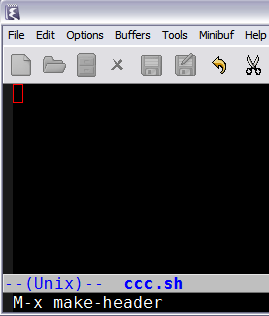

This will create a template for shell scripts as shown below.  Note that the user name is picked up from user-full-name which needs to be set in your .emacs.
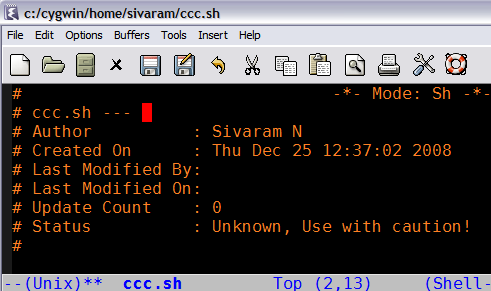

The moment I save the file, the "Last Modified" lines and the update count are automatically updated and are done every time the file is saved.
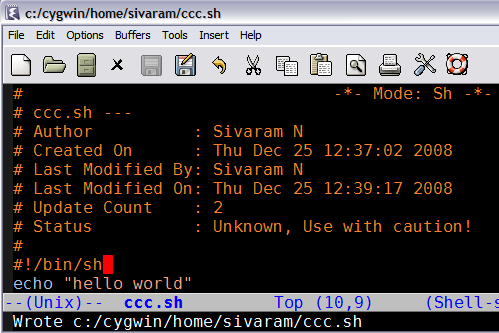


Well, you'd obviously like to put in some revision history and that is done by M-x make-revision which creates a history section as shown
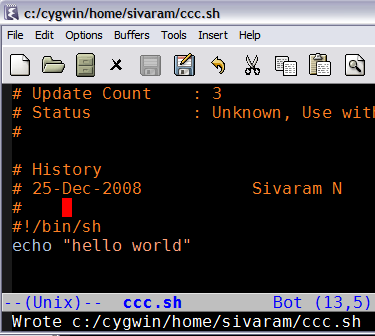


The commentary inside header.el has more information on customising these features, especially copyright notices and header design to suit your organisation's standards.  From the header.el source file

;;;;;;;;;;;;;;;;;;;;;;;;;;;;;;;;;;;;;;;;;;;;;;;;;;;;;;;;;;;;;;;;;;;;;;;;
;; Define the individual header elements.  THESE ARE THE BUILDING BLOCKS
;; used to construct a site specific header.  You may add your own
;; functions either in this file or in your .emacs file.  The variable
;; make-header-hooks specifies the functions that will actually be called.
;;;;;;;;;;;;;;;;;;;;;;;;;;;;;;;;;;;;;;;;;;;;;;;;;;;;;;;;;;;;;;;;;;;;;;;;


And user customisable options such as

;; This file adds support for the creation and automatic maintenence of file
;; headers such as the one above.
;;  User Commands:
;;   M-x make-header
;;   M-x make-revision
;;   M-x make-divisor
;;   M-x make-box-comment
;; Customizer commands
;;   register-file-header-action
;; Customizer variables
;;   header-copyright-notice
;;   make-header-hooks


It's a good idea to put all the changes into your .emacs instead of editing the source elisp file.

One other note:  The emacswiki site has a section on AutomaticFileHeaders that outlines some improvements over header.el and available as header2.el done by Drew Adams.  You may want to try that too, though I haven't tried the new version.

Sunday, December 21, 2008

Footnote mode

Those familiar with LaTeX will understand footnotes and how they are generated when the LaTeX document is compiled.  Emacs too, comes with a footnote package that sort of imitates the LaTeX style.  This can be used in any text based document whether it is emails or plain articles.

Footnotes mode is bundled with Emacs, so it's invoked by M-x footnote-mode.  It is a minor mode which is really handy especially when you don't want your text to be marred by long urls, lengthy explanations which disrupt the flow of thought.  I find it useful by simply adding the dummy footnotes for key words and the like and then writing the explanation at the bottom as I complete the article.

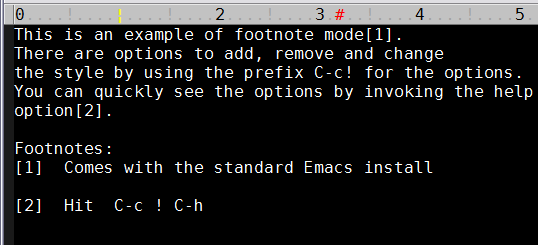
A screen shot of how it works will  


While this adds some nice professional look to your text based email, there are some minor issues to be borne in mind.  The numbering is not preserved between sessions i.e. when the file is re-opened, numbering will start again from 1.  This might not be ideal though it is easy to work around with, by increasing the sequence till it matches the current valid running number.

Or as the wiki pages go,there is a patch to fix that.  But that is not yet part of the mainline Emacs 23, so it's left to you to remember to upgrade whenever Emacs is upgraded.


Tuesday, December 16, 2008

How to make Gnus behave a little like Pine

This just up on the Emacswiki.  A page describing how to make your Gnus behave more like Pine.

Quite why you'd want to do that is beyond me as they're different as chalk and cheese.  Well, apart from being text based email clients, that is.

Still, whatever floats your boat.

Friday, December 12, 2008

How to get information out of a subshell?

The above topic seems to be a pretty common request on the comp.unix.shell newsgroup.  It was for me too, when I was learning shell programming.  Sooner or later, as a noob, you run into that code fragment that doesn't store the values you were sure were getting generated.  Heck, look at all the echo statements, you put in!

It seems to take a bit programming experience to figure out these subshells, processes, command substitution and the like.  The more code you write, the more likely you are going to get into situations where such features are absolutely required for your code to work.

This thread here provides several ways to do it by other coders.