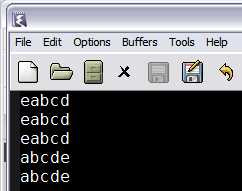
The Emacs rectangle commands operate on rectangular blocks of text. (Surprise?) This is useful when you're working on columnar text and you need to work on columns of data much like Microsoft Excel. Here, I'm going to show you how to use them using a few contrived examples. Let's say we have following text entered in the scratch buffer.

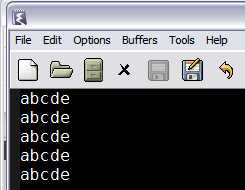
Mark a rectangular block of text using
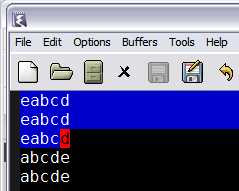
C-SPC from column 1 to the 4th column in line 3. You should see something like this.

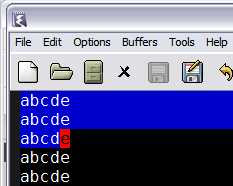
Now, this is a rectangle of 4Cx3R. On this you can operate any rectangle commands. The first is obviously
kill-rectangle, bound to
C-x r k. Applying that on the above state of the buffer you should see the following.
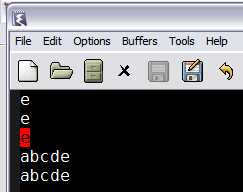

As you can see, the remaining text has been shifted to the left after killing the rectangular block of text. Since the text was killed as opposed to deleted which is bound
C-x r d, the rectangular text is available to be yanked(pasted) in another place if required.
C-x r y will yank the rectangular text back at point as shown.


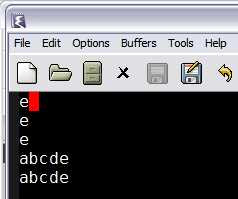
The difference between
kill-rectangle and
delete-rectangle is that the former stores the killed text in kill rectangle ring while the latter doesn't.
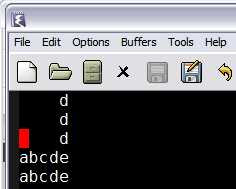
Right, what happens if you don't want to shift the text to the left but just clear out a block of text? Well, that's when you use
clear-rectangle bound to
C-x r c.


But if you want to push text to the right as opposed to clearing it, you'd use
open-rectangle bound
C-x r o.
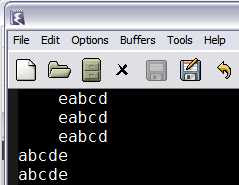
Note how the entire block of text is shifted rightward without anything getting deleted. So, if you wanted to enter text in the space, toggle the Overwrite key(to prevent the existing text from moving further rightward), fill in the text and toggle the key back again.
But, you say, I don't want to enter the same text in the columns over and over again. In fact you just want some standard text to be plugged in. No worries, you have
C-x r t STRING to do that for you.
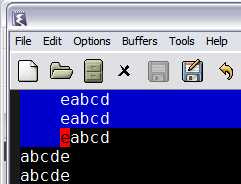
Mark the rectangular region as shown,


press
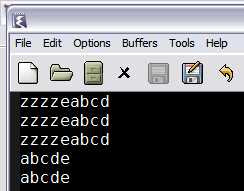
C-x r t zzzz and you should see the above result. Useful for chunks of repeated columnar text when data is sorted by nationality, sex,currency etc. (which is pretty representative of textual data)
Oops, you forgot to insert an
x in front of all the lines starting with
z's?
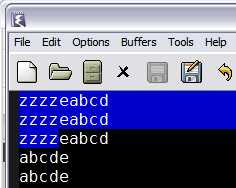



No problem, just follow the above instructions, you should see this then.
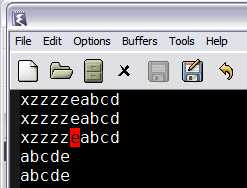

Notice that even though a 4x3 block was marked, the inserted text was only 1 character and still everything came out correctly? The same happens with text which is more than 4 in this case, the columns shift to the right.
The most common uses of the rectangle commands are those that involve aligning columnar data, inserting and deleting columns of data, applying standard texts and the like.
Hopefully, this tutorial addresses the existence of rectangles in Emacs and how to use them. The
Emacs manual has a little bit more on rectangles and how to use them with registers too. The canonical place to refer is the manual when things deviate from what I've mentioned above.


